Notice

Join This Channel To Get Latest Phone Tips,Tricks,News,Network Security Course,Hacks etc. For Free on Your Mobile!! ... Join our Facebook Discussion Group -Regards Ankit
Showing posts with label Google. Show all posts

06 April 2012

Google Trick to Find Private Stuff


Maybe you need some pictures for your school work.

Of course you can go to a dedicated website where you can find lot of free pictures.

But you can also dig some private pictures directories.

Try this little code in Google, you may find lot of Non public pictures


Quote:
intitle:index.of +"Indexed by Apache::Gallery"
search by adding a word at the end, for example:


Quote:
intitle:index.of +"Indexed by Apache::Gallery" +paris
I just realize that maybe some of you guys use Apache Gallery for your own private pictures.

If you want to verify if your own private pictures ares indexed, just paste this code in Google.

Quote:
site:www.YourSite intitle:index.of +"Indexed by Apache::Gallery"
(Replace Your Site by the server hosting your pictures (your URL.)
Apache::Gallery"
Enjoy...

01 March 2012

Why Google+ is better than Facebook


Google plus is the latest thing in town when it comes to social media sites existence. Everyone wants to get on board. The sharing and socializing becomes easier with the site because of the cool benefits it has over any other socialnetworking sites on the globe. Google plus is a social site that helps people especially bloggers to get the best of theirsocial activities. With the site, you can do all what you wants and get what you need without stress or hassle. Lately,Google plus adds new cool feature to some of other things that has being on the site with the rel-authorintegration. This helps bloggers to get more search engine exposure and helps grow their respective blogs due to huge amount of traffics that Google search engine sent to them every time.
I have just experienced traffic spikes on my gravity defyer and 48hourprint blog when I started using the rel-author benefits by linking my google+ profile to my website and with this, it helps me get more traffic and it also boost my search engine presence as a blogger online and this surpass what I can get from using facebook.
If you are yet to be on Google plus, this article will be showing you some of the reasons why you need to be there than to be on facebook.
Sharing of Links Does Not Attract Any Penalization
Link sharing is one of the benefits that make me to dump facebook for google plus because the site allows me share my website links and posts without any restriction. On facebook either, there is limited amount of links you can share on your wall, but googleplus makes it easier for me to share links.
Easy to Use Interface
Another thing that you can consider to choose google plus over facebook is because of the clean interface. Everything there looks cool and there are no cluster links and ads because the site is ads-free.
No Limitation
Limitation occurs though and it is because the site is still in the demo mode. Limitation only occurs on the amount of friends you can add to your circle and that does not mean that you will not be able to share information just like the way facebook is doing.
No Unscrupulous Tagging
Tagging is one of the reasons that make many people hate facebook but, on google+, the tagging feature is now at limit. You cannot tag people in picture like how people use to do on facebook without the person getting to know about it.
Third Party Plugins
All the third party apps that are on facebook only work for the negativity of most bloggers. Think of all the third-party plugins or addons that are on google plus, they are made for people to use in experiencing the site better. I shared one of such plugins on my websitesome months ago about a google plus addon that can allow bloggers to share google plus updates to twitter and vice-versa. But, on facebook, only few apps are made for this purposes because of the rejection of different apps from developers by the facebook development team.
 
Enjoy...

25 February 2012

Google is a Malware Scanner


Some particular malwares infect the user computer and try to send traffic to  Google through a small number of intermediary servers called “proxies.”  Google found some unusual traffic while performing routine maintenance on one of their data centers.


After Google is collaborating with security engineers at several companies that were sending this modified traffic,  they determined that the computers exhibiting this behavior were infected with a particular strain of malicious software, or “malware.”

Today, if anyone has these type of malware , they will notify as your system is infected while searching in google.

Enjoy...

16 February 2012

Adsense Approval Dirty Method 2012


FIRST METHOD USING BUKISA


  1. Go to Bukisa and register for new member.
  2. Confirm your email to complete your register.
  3. Download one or some free e-Book from any search engine, like example use Google.
  4. You can use some topic based from your interest like Money Online or anything.
  5. Now copy and paste those articles from that e-Book to Bukisa.
  6. Submit minimal three contents, and wait until they accepted.
  7. Some time the site is in heavy job and approve the articles after 2 days.
  8. Soon you will get Bukisa mails that inform your articles have approved.
  9. After getting approved article apply for Google Adsense by this way.
  10. Bukisa may ask you if you already have Google Adsense Account and then tick no.
  11. Next, enter your e-Mail Id that you have given at the time of bukisa sign up.
  12. Last, you will get a link in your e-mail and that is for your Google Adsense.
  13. Fill it and be sure that the info you will give to them must match with Bukisa.
  14. And done, You will get email from Google Adsense that your account is approved.

SECOND METHOD USING FLIXYA

Follow the below mentioned steps and you will get Adsense approval in just 2 days.
  1. Go to Flixya
  2. Register and complete ten contents.
  3. It may be photo, blog, article, and video.
  4. After that once you make your current account with this site you will get a fresh form in the second step, the Google Adsense sign up form. Input your valid e-mail address to start a Adsense account. We prefer G-mail regarding far better results.
  5. After you sign up it gives you a publication Id and then after 1-2 days your account will be approved

THIRD METHOD USING INDYAROCKS.COM

Unless you have any videos or even PPT presentations to talk about for the above site next i've one more strategy to get you approval with Adsense in mere two days
  1. You all may be aware of Indyarocks, the 1st step is to go to Indyarocks and the first step should be to visit Indyarocks and apply for an account with them.
  2. Once you register, sign in to your current account plus check out earning link around the right sidebar inside your profile.
  3. Indyarocks is a channel associate with google adsense that makes it possible to to earn income with them by sharing and also generating blogs. And you must satisfy their following conditions for adsense approval. Note the below mention conditions of indyarocks to get full filed for adsense approval. Your own Profile should be at least 80% complete.
    • Your profile privacy should be set to everyone.
    • You have to publish as a minimum ten photos for your profile and also the privacy from the photos should be set to everyone.
    • You need to posting at least 2/3 blogs and also the articles needs to be unique and also the privacy from the blogs should be set to everyone.
Enjoy...

27 January 2012

Google Funny Tricks 2012


Google search box not only analyze our search string and display perfect results but also provide variety of features such as currency conversions, movie timings, weather forecasts, calculator etc.

However, there is something funny about Google Calculator. Look at these screen-shots :

Google funny calcuator 1


Google funny calcuator 2

Google funny calcuator 3

Google funny calcuator 4

Google funny calcuator 5

Google funny calcuator 6

google calculator mistake 7
Google calculator also provides answers to conversations such as :


  • What’s the answer to life, the universe and everything multiplied by the speed of light divided by three teaspoons?

  • How many seconds in a decade?

  • What’s 98.6 degrees Fahrenheit in Celsius?

  • How many feet in a smoot?

  • Number of horns on a unicorn?

  • What is a googol?

  • What is 1.21 gigawatts divided by 88 miles per hour?

  • What is 1.21 gigawatts multiplied by 88 miles per hour?

  • What is 1 hogshead in litres?

  • What is 30 gigabytes divided by 192kbps?

  • What is 1 furlong per minute?

  • What is 13000 watts to horsepower?

  • How many km in a light year?

  • How many teaspoons in a pint?

  • How many megabytes in an exabyte?

  • What is 125444987 in binary?

  • What is 2008 in roman numerals?

  • What is 100 USD to AUD?

  • What is the mass of the Sun in pounds?

  • What is the square root of 123456789?

  • What is square root of 123456789?

  • Enjoy...

    19 January 2012

    Add a Free Chat Box Widget to Your Blogspot Blog


    Here’s the easiest way to add a free Blogger chat box widget (also known as shoutbox, chatterbox, or chat room) to your Blogspot blog. Adding a chat box widget to your blog is an easy way to build community on your site and keep your visitors coming back. It’s so easy we can do it in less than a minute. We’ll use Chatroll live communities to create a chat box widget, customize it, and add it to your Blogger layout.
    Here’s a screenshot of a Blogger blog with a chat box embedded in the main column:


    These steps are easy enough for anyone, but if you have any trouble, you can contact Chatroll Support via live chat or email. Let’s get straight to it!
    Create a Chatroll live community to use for your chat box.
    Go to Chatroll, enter your community’s name in the “Name Your Live Community…” box and click “Create”. Choose a name that fits with your blog, as this name will appear in the chat box title. Write an attractive and detailed description so that people can easily find your new Chatroll community (this will also help drive traffic to your blog).

    Copy the chat window embed code from your live community’s home page.
    In your new live community’s home page (the page that is shown after your community has been successfully created) copy the embed code from the text box labeled ‘embed’. This text box is located under the chat window, as shown below:

    Edit your Layout in Blogger.
    In Blogger, click on the “Layout” tab to show your blog’s layout:

    Add a new HTML/Javascript gadget.
    On your blog’s layout screen, click the “Add a Gadget” link to open the Add a Gadget window:
    In the Add a Gadget window, scroll down and find the “HTML/Javascript” gadget. Click on the “+” icon to add it.


    Paste the Chatroll embed code into the HTML/Javascript gadget.
    On the new HTML/Javascript gadget screen, enter a title for the gadget. A good title should alert your readers that this is your site’s live chat. Here’s the important part: Paste the chat window embed code into the Content area (this is the code you copied from Chatroll in step 2):

    Finally, click “Save”. The gadget should now be visible in your blog’s layout.
    That’s it! You’ve just chat-enabled your Blogger or Blogspot blog! You can now use the Blogger Layout tab to drag the chat box widget wherever you want in your blog’s layout.
    Here’s a few more tips for best results:
    Position the chat box so it appears on every page: For best results, place the chat box where it will appear on every page, so that your readers can continue their conversation even if they move from one page to another within your blog.
    Match the chat box colors and size to your blog’s template:To further maximize your chat widgets’s success, you’ll want to customize it to match your site design. Chatroll lets you customize the position, size, and color of the chat to fit in perfectly with your blog’s template. Each time you customize the chat, simply click “Edit” on the chat gadget in the Blogger Layout page and re-paste the embed code.
    Enjoy...

    13 January 2012

    How to get the serial number you need


    * Go to Google.

    * In the search field type: "Product name" 94FBR

    * Where, "Product Name" is the name of the item you want to find the serial number for.

    * And voila - there you go - the serial number you needed
    .

    HOW DOES THIS WORK?

    Quite simple really. 94FBR is part of a Office 2000 Pro cd key that is widely distributed as it bypasses the activation requirements of Office 2K Pro. By searching for the product name and 94fbr, you guarantee two things. 1) The pages that are returned are pages dealing specifically with the product you're wanting a serial for. 2) Because 94FBR is part of a serial number, and only part of a serial number, you guarantee that any page being returned is a serial number list page.

    See these example searches:

    "Photoshop 7" 94FBR
    "Age of Mythology" 94FBR
    "Nero Burning Rom 5.5" 94FBREnjoy...

    12 January 2012

    Password Dorks Google -Google Password Hacking


    Here are Some Of The Google Dorks,That Will Get you Some Juicy Passwords,Have Fun:

    "admin account info" filetype:log
    ! Host=*.* intext :enc_UserPassword=* ext:pcf
    "# -FrontPage-" ext:pwd inurl: (service | authors | administrators | users) "# -FrontPage-" inurl:service.pwd "AutoCreate=TRUE password =*" "http://*:*@www" domainname
    "index of/" "ws_ftp.ini" "parent directory" "liveice configuration file" ext:cfg -site: sourceforge.net
    "parent directory" +proftpdpasswd
    "powered by ducalendar" -site:duware.com "Powered by Duclassified" -site: duware.com
    "Powered by Duclassified" -site:duware.com "DUware All Rights reserved"
    "powered by duclassmate" - site:duware.com
    "Powered by Dudirectory" -site:duware.com "powered by dudownload" -site: duware.com
    "Powered By Elite Forum Version *.*"
    "Powered by Link Department"
    "sets mode: +k"
    "your password is" filetype:log
    " Powered by DUpaypal" -site: duware.com
    allinurl: admin mdb auth_user_file.txt
    config.php
    eggdrop filetype:user user
    enable password | secret "current configuration" -intext : the
    etc (index.of)
    ext:asa | ext:bak intext :uid intext :pwd -"uid..pwd" database | server | dsn
    ext:inc "pwd=" "UID=" ext:ini eudora.ini
    ext:ini Version=4.0.0.4 password ext:passwd -intext :the - sample -example
    ext:txt inurl:unattend. txt
    ext:yml database inurl:config filetype:bak createobject sa
    filetype: bak inurl:"htaccess|passwd|shadow| htusers"
    filetype:cfg mrtg "target[*]" - sample -cvs -example
    filetype:cfm "cfapplication name" password filetype: conf oekakibbs
    filetype:conf slapd.conf filetype:config config intext : appSettings "User ID"
    filetype:dat "password .dat"
    filetype:dat inurl:Sites. dat
    filetype:dat wand.dat
    filetype:inc dbconn
    filetype:inc intext : mysql_connect
    filetype:inc mysql_connect OR mysql_pconnect filetype:inf sysprep
    filetype:ini inurl:"serv-u.ini"
    filetype:ini inurl: flashFXP.ini
    filetype:ini ServUDaemon filetype:ini wcx_ftp
    filetype:ini ws_ftp pwd
    filetype:ldb admin
    filetype:log "See `ipsec --copyright"
    filetype:log inurl:"password .log"
    filetype:mdb inurl: users.mdb
    filetype:mdb wwforum filetype:netrc password filetype:pass pass intext :userid
    filetype:pem intext : private
    filetype:properties inurl:db intext :password filetype:pwd service filetype:pwl pwl
    filetype:reg reg +intext :"defaultusername" +intext
    :"defaultpassword"
    filetype:reg reg +intext :”WINVNC3”
    filetype:reg reg HKEY_CURRENT_USER SSHHOSTKEYS
    filetype:sql "insert into" (pass|passwd|password )
    filetype:sql ("values * MD5" | "values * password " | "values * encrypt";)
    filetype:sql ("passwd values" | " password values" | "pass values" )
    filetype:sql +"IDENTIFIED BY" -cvs
    filetype:sql password filetype:url +inurl:"ftp://" +inurl:";@"
    filetypels username password email
    htpasswd
    htpasswd / htgroup
    htpasswd / htpasswd.bak
    intext
    :"enable password 7"
    intext :"enable secret 5 {:content:}quot;
    intext
    :"powered by EZGuestbook"
    intext
    :"powered by Web Wiz Journal" intitle:"index of" intext :connect.inc intitle:"index of" intext :globals.inc intitle:"Index of" passwords modified intitle:"Index of" sc_serv.conf sc_serv content
    intitle:"phpinfo()" +"mysql. default_password" +"Zend Scripting Language Engine"
    intitle:dupics inurl: (add.asp | default.asp | view.asp | voting.asp) -site:duware.com
    intitle: index.of administrators.pwd
    intitle: Index.of etc shadow
    intitle:index.of intext :"secring.skr"|"secring. pgp"|"secring.bak"
    intitle:rapidshare intext :login
    inurl:"calendarscript/users. txt"
    inurl:"editor/list.asp" | inurl:"database_editor.asp" | inurl:"login.asa" "are set"
    inurl:"GRC. DAT" intext :"password "
    inurl:"Sites. dat"+"PASS="
    inurl:"slapd.conf" intext
    :"credentials" -manpage -"Manual Page" -man: -sample
    inurl:"slapd.conf" intext :"rootpw" -manpage -"Manual Page" -man: -sample
    inurl:"wvdial. conf" intext :"password "
    inurl:/db/main. mdb
    inurl:/wwwboard
    inurl:/yabb/ Members/Admin.dat
    inurl:ccbill filetype:log
    inurl:cgi-bin inurl:calendar. cfg
    inurl:chap-secrets -cvs
    inurl:config. php dbuname dbpass
    inurl:filezilla.xml -cvs
    inurl:lilo.conf filetype:conf password -tatercounter2000 -bootpwd - man
    inurl:nuke filetype:sql
    inurl:ospfd. conf intext :password -sample -test - tutorial -download
    inurl:pap-secrets - cvs
    inurl:pass.dat
    inurl:perform filetype: ini
    inurl:perform.ini filetype:ini
    inurl: secring ext:skr | ext:pgp | ext:bak
    inurl: server.cfg rcon password inurl: ventrilo_srv.ini adminpassword
    inurl: vtund.conf intext :pass -cvs
    inurl:zebra. conf intext :password -sample -test - tutorial -download
    LeapFTP intitle:"index.of./" sites.ini modified master.passwd
    mysql history files NickServ registration passwords
    passlist passlist.txt (a better way)
    passwd passwd / etc (reliable)
    people.lst psyBNC config files
    pwd.db
    server-dbs "intitle:index of"
    signin filetype:url spwd.db / passwd
    trillian.ini
    wwwboard WebAdmin inurl:passwd.txt wwwboard|webadmin
    [WFClient] Password = filetype:ica
     
    Enjoy...

    18 September 2011

    All About Google Flight Search


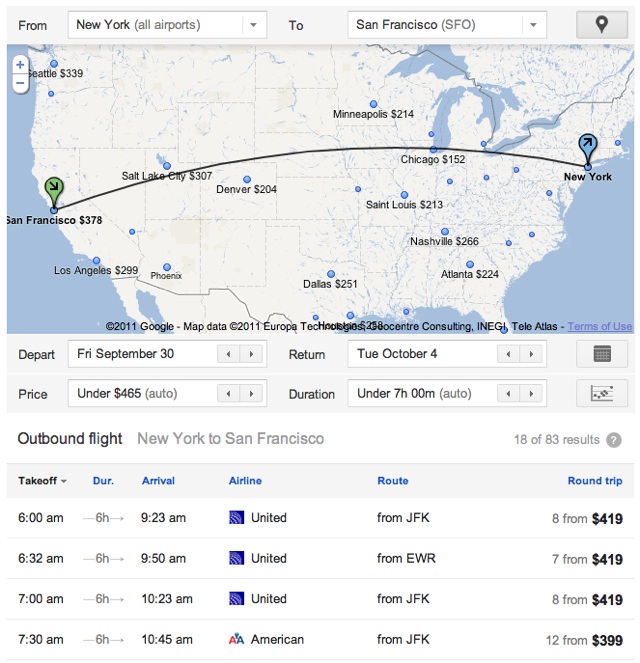
    Google has just launched their new Flight Search feature that helps you explore air travel options to plan trips.
    Google has made what amounts to a promising down payment on more ambitious travel search tools with its new Flight Search, debuting today. Launching initially for a select group of US cities Google users will have access to an expanded range of airline search options and a much more verticalized experience than has been available in the past on Google.
    This is the first product to emerge from Google’s controversial acquisition of travel software company ITA, which closed in April and included concessions and guarantees to existing ITA customers such as Kayak, Microsoft, Orbitz, Hotwire and TripAdvisor. The past five months have been spent on integration of the ITA team and technology in Boston.


    google-flight


    Once an outbound and return flight are selected — there are no one-way or multi-city capabilities right now — users are taken to an airline website to book. The content presented in Flight Search results is all organic. However, as the image below indicates, the booking link is or could be an ad. According to Google this is the only advertising in Flight Search.
    Google said it’s still experimenting with the model. It’s not entirely clear what would happen if the selected airline were not an advertiser. Are only advertiser flights being included in the data presented? I assume not. However when most travel sites such as Kayak or Orbitz deliver a user to an airline or hotel site there’s lead-gen fee or bounty paid. And Google may have struck agreements with all the major carriers accordingly.
    At the moment, Google Flights is limited, though useful tool, but one can only assume Google will grow the service into a unique product at some point in the future. Check out Google’s introductory video below.
    Enjoy...

    29 September 2010

    GMail DOT Trick


    Hey Guys I have came across a new Great Amazing Trick that is GMAIL DOT TRICK...Its really amazing ..check It...

    WHAT IS GMAIL DOT TRICK ?????

    Suppose There is a Gmail account : Example@gmail.com
      having password : abcd

    You will get logged in to example@gmail.com If you use
    email as : E.xample@gmail.com
    password : abcd
    email as : Ex.ample@gmail.com
    password : abcd
    email as : Exa.mple@gmail.com
    password : abcd
    email as : Exam.ple@gmail.com
    password : abcd
    email as : Examp.le@gmail.com
    password : abcd
    and so on..

    That means gmail does not count periods (.). So isnt its Great ...

    So you can use this trick for using the same email for various GPT, PTC, Twitter accounts as they interpret all the above emails as different but gmail considers it the same.
    Enjoy...

    06 May 2010

    Gtalk Secret Emotions


    Here’s a list of utterly new emoticons/smileys:
    Classic
    Round
    Square
    Type this

    Cowbell

    Cowbell

    Cowbell
    +/’\

    Crab

    Crab

    Crab
    V.v.V

    Devil

    Devil

    Devil
    }:-)

    Equal sad

    Equal sad

    Equal sad
    =(

    Equal slant

    Equal slant

    Equal slant
    =/

    Equal tongue

    Equal tongue

    Equal tongue
    =P

    Nose sad

    Nose sad

    Nose sad
    :-(

    Smile

    Smile

    Smile
    :)

    Wince

    Wince

    Wince
    >.<

    Nose tongue

    Nose tongue

    Nose tongue
    :-P

    Pig
    Pig

    Pig
    :(:)

    Broken Heart

    Broken Heart

    Broken Heart

    Kiss

    Kiss

    Kiss
    :-x

    Kiss

    Kiss

    Kiss
    :*

    Mustache

    Mustache

    Mustache
    :{


    Classic
    Round
    Square
    Type this

    Heart/Love

    Heart/Love

    Heart/Love
    <3

    It’s a monkey!

    It’s a monkey!

    It’s a monkey!
    :(|)

    Rock out.

    Rock out.

    Rock out.
    \m/

    Shocked

    Shocked

    Shocked
    :-o

    Grin

    Grin

    Grin
    :D

    Frown

    Frown

    Frown
    :(

    Angry

    Angry

    Angry
    x-(

    Cool

    Cool

    Cool
    B-)

    Cry

    Cry

    Cry
    :’(

    Equal Grin

    Equal Grin

    Equal Grin
    =D

    Wink

    Wink

    Wink
    ;)

    Straight Face

    Straight Face

    Straight Face
    :-|

    Equal Smile

    Equal Smile

    Equal Smile
    =)

    Nose Grin

    Nose Grin

    Nose Grin
    :-D

    Big nose wink

    Big nose wink

    Big nose wink
    ;^)

    Nose wink

    Nose wink

    Nose wink
    ;-)

    Nose smile

    Nose smile

    Nose smile
    :-)

    Slant

    Slant

    Slant
    :-/

    Tongue

    Tongue

    Tongue
    :P


    Update 1: Try it out with [:|] robot
    Update 2: Try it out with ~@~ poop

    Views This Month


    HaCk-O-PeDia - The Hacker's Encyclopedia. Copyright 2010 All Rights Reserved To Ankit